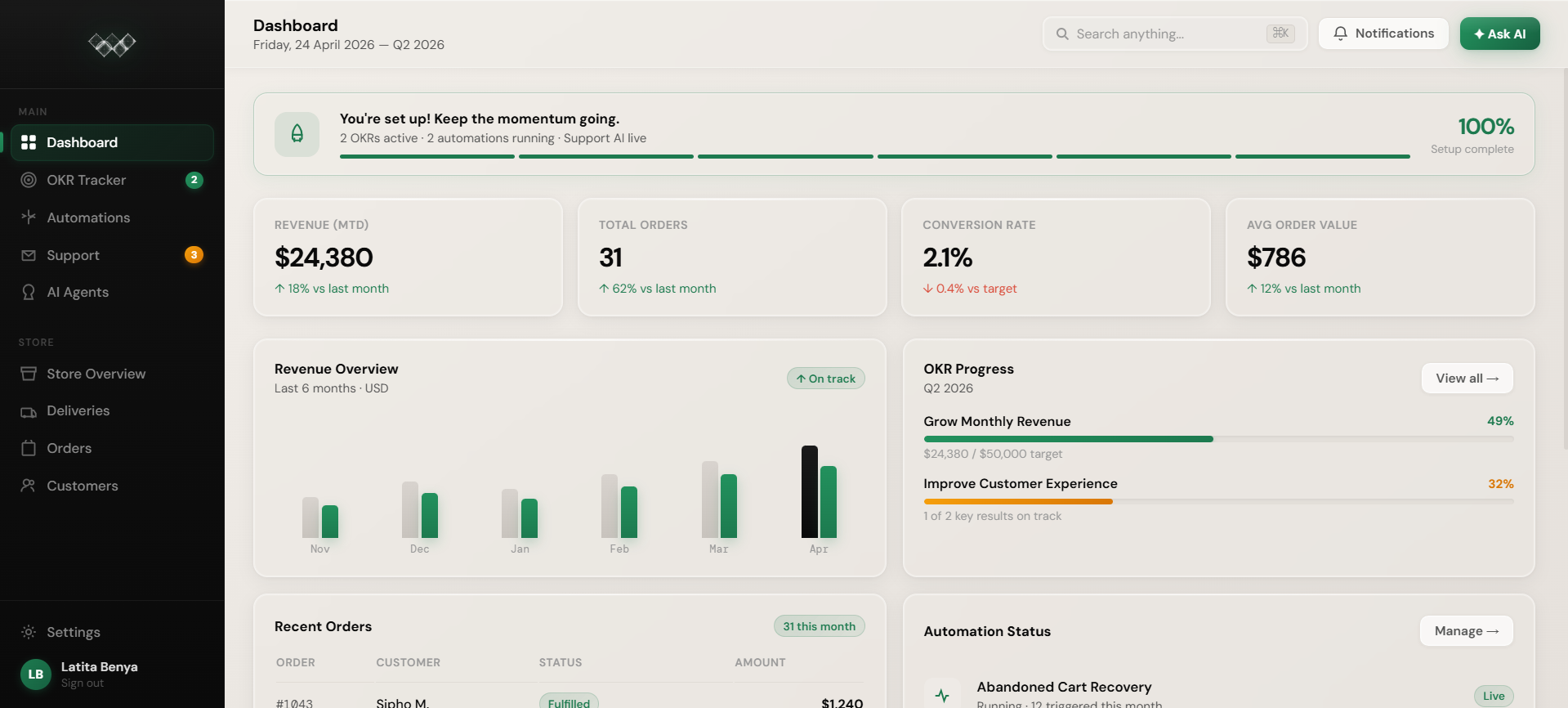
Teboa is an AI-powered eCommerce operating system for Shopify store owners. Shopify stays as the commerce engine for products, checkout, payments, orders, and customer records. Teboa adds the operating layer around it: store activity, support, automations, customers, goals, and AI guidance in one workspace.
The point is to reduce app switching and help store owners see what needs attention without jumping between Shopify, a helpdesk, automation tools, and spreadsheets.
Use the Log in button on this page or go to app.teboatech.com. Teboa uses Firebase authentication and keeps your session synced through a secure server session cookie after sign-in.
If you are claiming billing or early-access access after login, the app checks for pending billing state during login and verification before taking you into the dashboard.
Open Store Overview or Settings in Teboa, enter your permanent yourstore.myshopify.com URL, and approve the Shopify permission screen. Use the myshopify.com URL, not a branded storefront domain, because Shopify OAuth identifies the store by its myshopify.com domain.
After approval, Teboa stores the Shopify integration against your account and updates the store settings used by dashboard, orders, customers, deliveries, automations, and agents.
The dashboard is designed to show the operating view of your store: revenue context, order activity, customer signals, product/store status, support work, automation activity, and goals. When your store is connected, those pages use live Shopify/API-backed data where available.
When a store is not connected, Teboa may show clear demo previews on some dashboard pages so you can understand the product. OKRs start empty by design, and Teboa does not fake live Shopify metrics when a connected store cannot load data.
Reconnect your Shopify store from Store Overview or Settings, approve the current permission screen, then retry the action that failed. This is especially important for fulfillment, customer data, product data, webhooks, or automation features that depend on Shopify scopes.
If the app says fulfillment permission is required, reconnect first, then return to Orders and retry fulfillment.
The usual causes are a disconnected store, an expired or missing Shopify token, changed permissions, or a store/account mismatch. Teboa checks live Shopify data through protected API routes and will show loading, error, or empty states when it cannot verify data.
Start by reconnecting the store with your myshopify.com URL and approving the latest permissions. If only customer data is missing, orders and overview may still load while the customers endpoint reports a permission or data-access hint.
Use the disconnect option in Store Overview or Settings. Disconnecting stops Teboa from using that Shopify connection for live dashboard data, orders, customers, deliveries, automations, and agents.
If you reconnect later, use the same myshopify.com URL and approve permissions again so Teboa can refresh the stored integration metadata.
Open Automations in the Teboa dashboard and enable or pause the flows you want. Teboa checks billing/trial access, email provider readiness, and Shopify webhook readiness before enabling live automations that need those services.
Supported built-in flows include order confirmation, review request, welcome series, low stock alerts, post-purchase upsell, abandoned cart recovery, win-back campaigns, and AI support routing. Unsupported or custom automations are blocked until an adapter exists.
Abandoned-cart recovery is part of Teboa's email automation engine. It is meant to follow up with shoppers who started buying but did not complete checkout, using store context and the automation rules available to your plan.
Depending on billing, trial status, and email setup, Teboa can create manual approval drafts or schedule provider emails through Resend. Scheduled email status is reconciled so paused or ineligible tasks do not keep sending.
Use Deliveries to review Shopify fulfillment tracking. Teboa reads real Shopify fulfillment tracking data and only creates delivery rows when a fulfillment has a tracking number.
If a fulfilled order has no tracking number, Teboa will not invent a delivery row. Carrier checks can also show whether a carrier integration is fully ready or only cataloged for future backend support.
Amy guides store operations, Sino manages automations, Sessy supports customer service and retention, and JJ helps with goals and growth.
The agents are there to help you interpret store context and decide what to do next, not to replace Shopify as the store backend.
Yes, once your Shopify store is connected and the relevant data is available. The app pulls shared store intelligence from Shopify provider state and settings, then uses it across dashboard and agent surfaces.
If the store is syncing, disconnected, empty, or blocked by permissions, the agent answer should reflect that state instead of pretending live data exists.
Teboa's agents can analyze context and recommend actions. Store-changing actions require approval, especially when they affect customers, support replies, automations, fulfillment, or email delivery.
This keeps the system useful without letting AI quietly make operational changes you did not approve.
Set your support email in Settings. Customer emails sent there can become support tickets in Teboa, where the support workspace can create, reply to, resolve, delete, or escalate tickets.
Connected stores use a shared store support workspace. Older account-level tickets can migrate into that shared store workspace when a connected store first requests tickets.
Open Support in the dashboard, choose the ticket, and use the available ticket actions. Teboa supports replies, resolve actions, and delete actions through the support ticket API.
When AI Support Routing is active, support activity can also create routing tasks so repeated customer requests become visible operational work instead of getting buried in an inbox.
Escalate requests that involve refunds, legal/privacy issues, complaints, payment disputes, chargebacks, sensitive customer information, or anything where a human decision is required.
Sessy can help draft and organize support work, but sensitive cases should stay under human review before sending or changing customer/account data.
The Orders page uses live Shopify data when connected and demo data when not connected. You can view and search recent order context, and Teboa merges Shopify order rows with overview data where useful.
Order statuses come from Shopify state and fulfillment data. If an order is fulfilled but lacks tracking, it may show as fulfilled in Orders while not appearing as a tracked delivery row.
Yes, when the Shopify store is connected, your account has access to that store, and the required fulfillment permissions are approved. Teboa reads Shopify fulfillment orders and creates a fulfillment when open fulfillment orders exist.
If fulfillment fails because permissions are missing, reconnect Shopify from Store Overview and approve the updated scopes before retrying.
The Customers page uses Shopify customer data when available. If customer endpoint data is incomplete, Teboa can derive customer rollups from order history so you still get useful context from purchases.
Retention workflows work best when you can distinguish new customers, repeat buyers, inactive customers, high-value customers, and at-risk customers instead of sending everyone the same follow-up.
Start with the customer behavior you want to act on: abandoned carts, first purchase, repeat purchase, inactivity, high-value spend, or support friction. Then choose the automation or manual follow-up that fits that behavior.
Teboa's win-back and retention flows are designed to turn those signals into follow-up journeys without forcing you to manage disconnected tools manually.
JJ helps with goals, growth priorities, and performance questions. The OKRs page stores your objectives in Firestore and starts empty by design so your real business goals are not mixed with fake sample objectives.
Use JJ to connect performance context to a next action: revenue goals, customer retention, support bottlenecks, automation opportunities, and the highest-leverage work for the store.
Settings covers profile details, store connection, billing, display preferences, support email, currency, timezone, navigation preferences, and disconnect actions. Some settings are saved to Firestore and some display preferences, like dark mode, can be stored locally for immediate UI hydration.
If something looks wrong across dashboard pages, Settings and Store Overview are the first places to check because they control store connection and account context.
Still need a hand?
Tell us what is slowing your Shopify store down and the Teboa team will help.